Run your marketplaces and your ERP from one panel.
For businesses selling on several channels: orders, stock and prices stay in step across every channel, and each order lands in your ERP on its own. Customer messaging, content production and camera analytics are modules you add only if you need them.
- We do the setup
- Shadow mode: watches first, writes later
- Monthly terms, leave any time
Marketplaces we connect to













E-commerce platforms & ERP










Shipping








All trademarks belong to their respective owners. Bulutegra does not claim an official partnership with these brands.
What is Bulutegra? Born from an e-commerce operation, not a software idea.
Bulutegra is a cloud platform where multi-channel sellers manage orders, inventory, pricing, customers and content in one place . It is the layer that sits between the marketplaces, your own website and your ERP — and takes over the whole flow in between.
We did not design it to sell it; we built it because our own operation needed it. We sell on dozens of channels ourselves, from Trendyol to Amazon, Ozon to Walmart. Every new channel taught us the same lesson: listing the product is not the problem — the problem starts after. We fixed every failure one by one; the system that emerged is Bulutegra.
That is why its screens contain no marketing language — only things that work in the field : alerts that tell you where the fault is, verifications that show their proof, orders nobody has to touch.
One panel
24 marketplaces, one screen. Orders, stock, prices, returns and commissions in one place — no hopping between marketplace panels.
Speaks to your ERP
Orders land directly in your ERP; invoicing and shipping continue in your own routine. We do not ask you to replace your existing system.
Field-tested
Every feature ran on our own orders first. Tested with real shipments and real customers, not in a demo environment.
Behind every feature there is a requirement from the field.
Bulutegra did not start as a software idea; it grew out of what a multi-channel selling operation actually needed. Three examples:
How is a marketplace integration set up? Four steps, and none of them require you to know software.
We do the setup. You only grant access to your accounts and approve the result.
1Connect
We register your marketplace API credentials and ERP access. Nothing changes in your stores.
2Match
Your products are matched to ERP records by SKU and barcode. Unmatched items are listed one by one.
3Watch
At first the system only reads: it watches orders, compares them with the ERP, shows discrepancies. It writes nowhere.
4Hand over
Once the numbers agree, we enable write access channel by channel. A channel you have not handed over keeps watching only.
Shadow mode is our own rule.
An integration claiming to work is not enough — it has to prove it. The system writes nowhere until it shows the numbers agree; the hand-over decision is yours, channel by channel.
Five minutes on the phone clears it up.
Tell us how many channels you sell on and which ERP you use; we will walk you through the right setup and price. Send the form and we call back as soon as we can.
Which problem shall we solve?
Six separate solutions. Each works on its own; together they share the same data. Click a card to see the details.
Sell on 24 marketplaces, manage them all from one screen.
- Orders flow from the marketplace into your ERP by themselves — nobody types them in.
- Stock and prices update across all channels at once; no double-selling.
- For cross-border sales, currency, invoice and customs details are prepared automatically.
Wherever customers write from, it all lands in one inbox.
- WhatsApp, marketplace questions and email merge into one screen.
- Frequent questions get automatic replies; conversations are handed over within the team.
- The customer’s order shows next to the conversation — no searching needed.

Let your cameras notice events, not just record them.
- Alerts you instantly when something happens in a zone you defined.
- Every event is stored in the panel with its clip and still, ready to review later.
- Footage never leaves your premises — the system runs entirely on-site.
Let customers find the right size before they order.
- Visitors enter height and weight and get the right size for that exact product.
- Added to your site with a single line of code; your design stays intact.
- Which sizes were recommended — and how well they fit — is reported.

Bring the trust you earned on marketplaces to your own site.
- Reviews are imported with their ratings and customer photos.
- New reviews are added automatically; no extra work.
- The look adapts to your site design.

Let AI produce your product content; you only approve.
- Generates promo videos from your product photos.
- Writes multilingual descriptions and search copy for foreign marketplaces.
- Creates size-chart images and flags problematic photos.
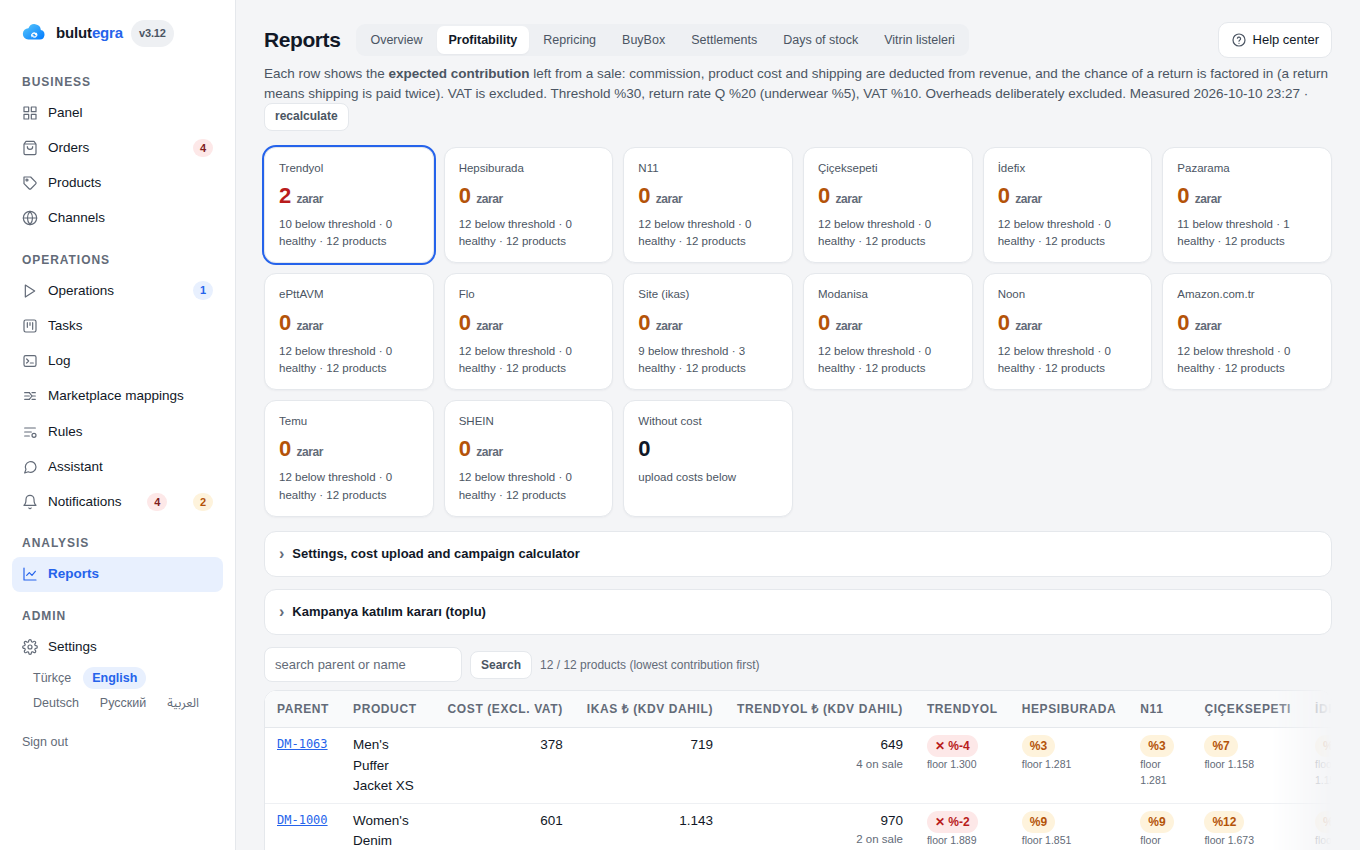
Product by product: what the marketplace kept and what you were left with.
The profitability screen: contribution per channel after VAT, commission, shipping and return risk. Type a campaign price and see at once which channel loses money.
From onboarding to settlements, a screen for every step of the job.
This is not a marketing list; these are the features running in the panel today.
Orders and stock 6
Orders
Every channel in tabs with counts. Search by date range, customer name or SKU, export to CSV in one click.
Single stock pool
A unit sold on one channel is deducted from every other channel within minutes; sold-out items never stay live.
Days of stock left
Shows how many days of stock each product has at its current sales pace; critical thresholds are set per product.
Master catalog source
Your product master lives in Shopify, WooCommerce, an XML/API feed — or ikas, Ticimax, T-Soft, İdeasoft; channels are fed from there.
Order timeline
Each order’s status history is kept; where the channel provides them, its own timestamps, who cancelled and the cancellation reason are on record too.
API and webhooks
Your own software reads orders, products and stock through a read-only API and receives new orders and status changes instantly by webhook.
Pricing and profitability 6
Price matrix
Per product, a channel × list / sale / floor price table. Floor rules in one click, currency rates managed centrally.
Profitability and campaign calculator
Expected contribution per channel with VAT, return risk and commission model; see instantly which channels lose money at a given campaign price.
Settlements and reconciliation
Marketplace settlements are pulled automatically. Missing settlements, non-refunded commissions and negative orders are tracked with status, ticket and notes.
Google Merchant feed
Your catalog is exported as XML for Google Merchant; your own store’s ad feed comes from the same place.
Price history
Every channel price is kept with the dates it was valid; the lowest price of the last 30 days is ready for discount-rule compliance.
Price brake
A target that strays too far from the current price is not sent; the number of prices changed in one pass is capped, and if a mass drop appears the drops are held while stock keeps flowing.
Quality and trust 6
Quality audit
Findings such as missing colour, wrong product type or uncategorised records are listed; the suggested fix is applied in bulk with one click.
System health
Channel runs, locks and connection delays on one screen; a channel that goes quiet is flagged and pushed to your phone.
Returns management
Customers start a return with e-mail and order code, the warehouse accepts it by barcode, return codes and exchange orders are created automatically.
Ownership flag
A per product × channel flag for “who manages this channel?”. Bulutegra never writes to a product managed by an external system.
Evidence log
Every stock and price update sent to a marketplace is recorded line by line with the channel’s response, and so is each invoice upload. When a marketplace asks, the export is ready.
Automatic rules
Stock threshold, large order, repeat customer and margin rules are first tried on your past data; you review the results and switch them on.
Team and everyday use 6
Setup wizard
Account, master catalog, marketplaces, first sync and finish: up and running in five steps. One-click authorisation for Etsy and eBay.
Roles
Admin, Content, Warehouse, Returns, Accounting and Reporting roles; everyone sees only their own work.
Two-step verification
A second step at login, hardened sessions and security headers.
Full panel on the phone
Sticky header, drawer menu and bottom quick-access bar; orders shown as cards on mobile.
Release notes
What changed in the panel is one tap away on the version badge; no surprises.
Panel assistant
Answers questions about orders, stock, alerts and sales from your own account data; syncs and order transfers start only on an explicit command.
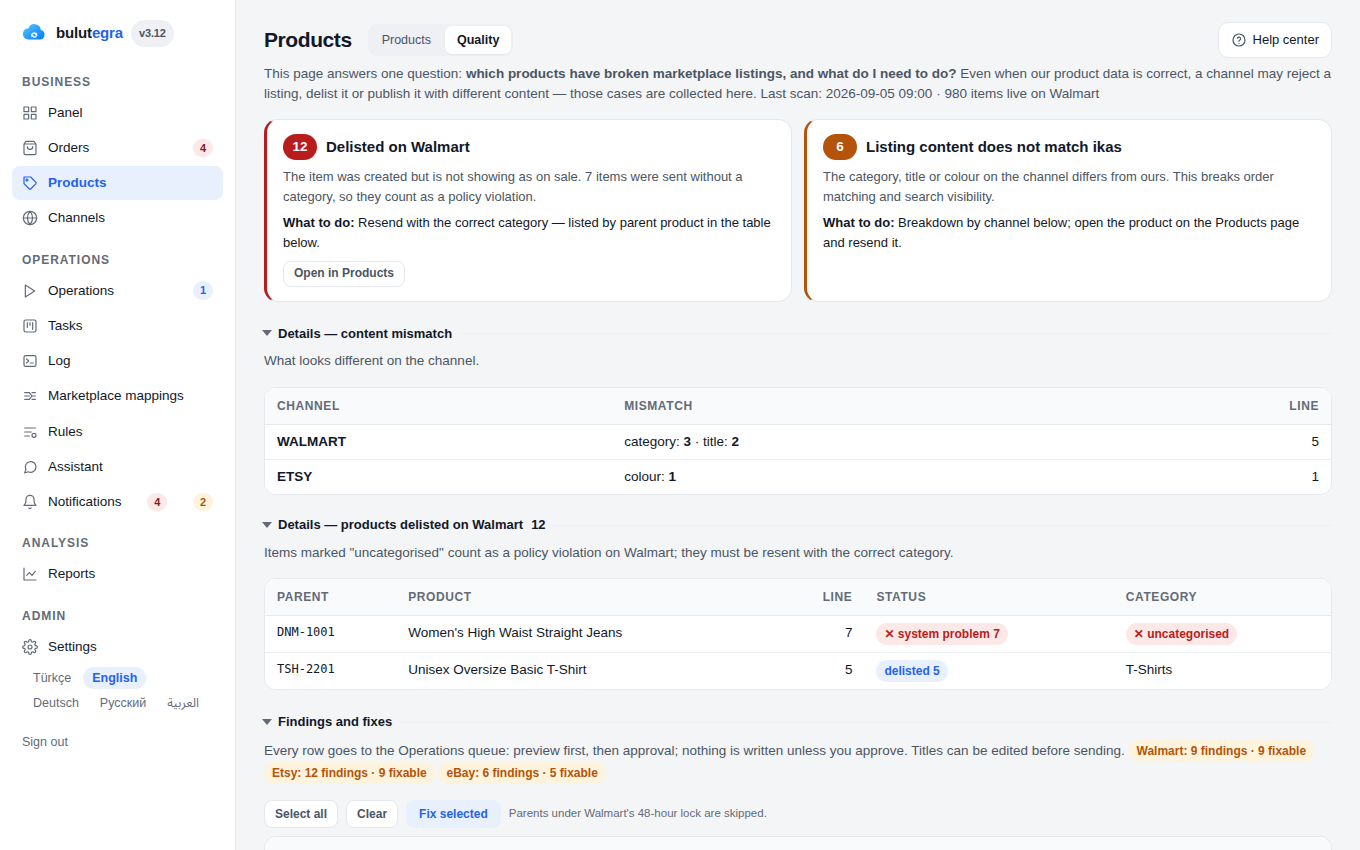
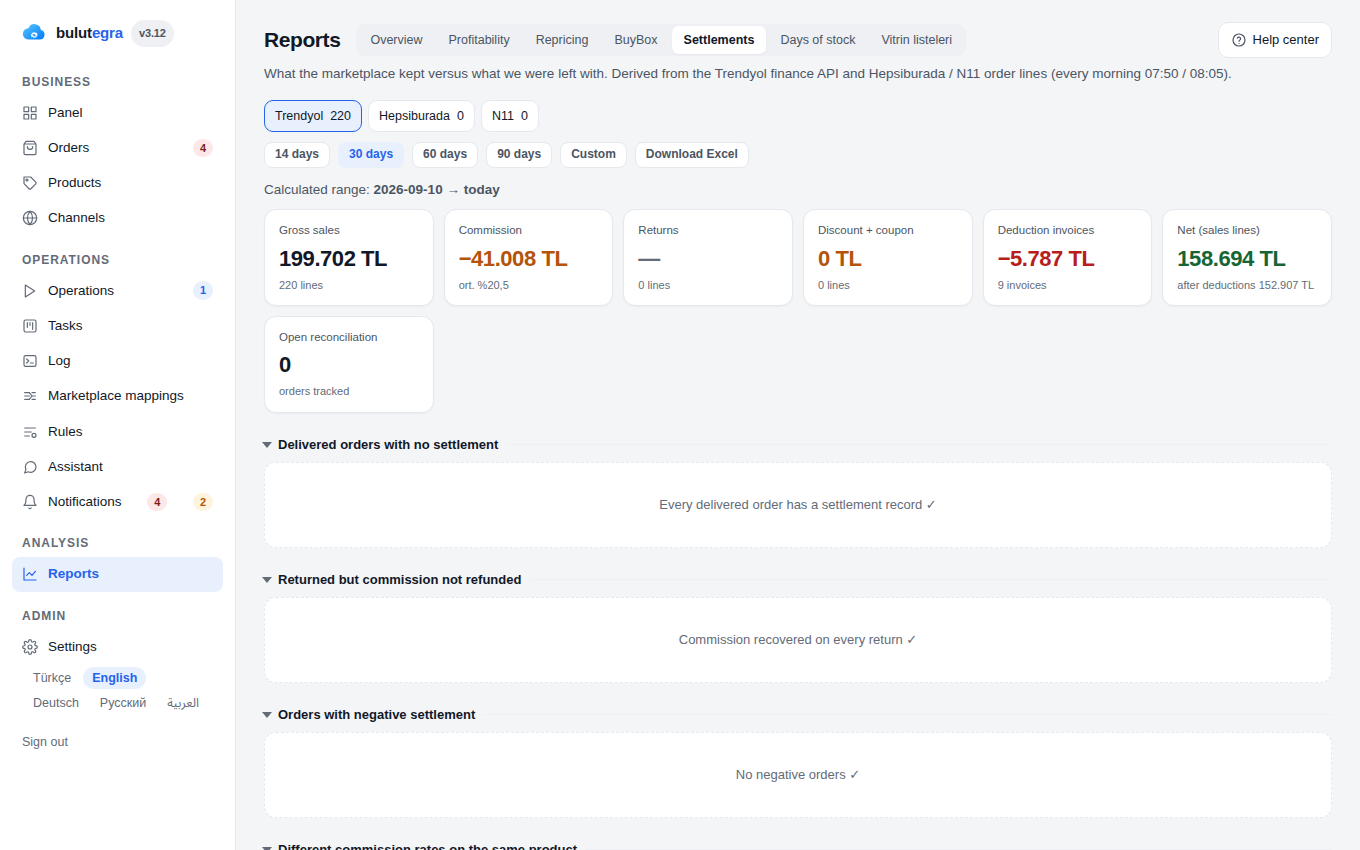
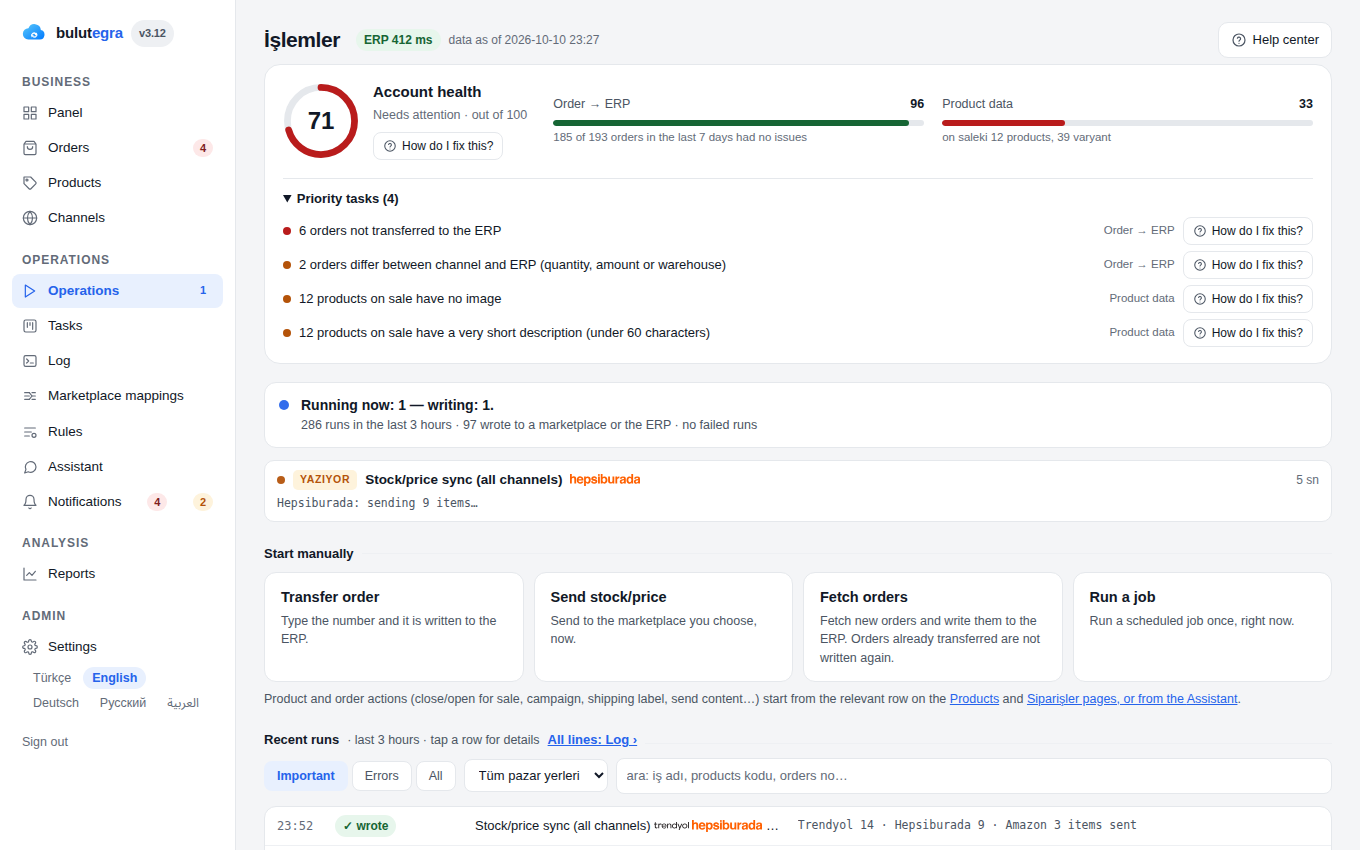
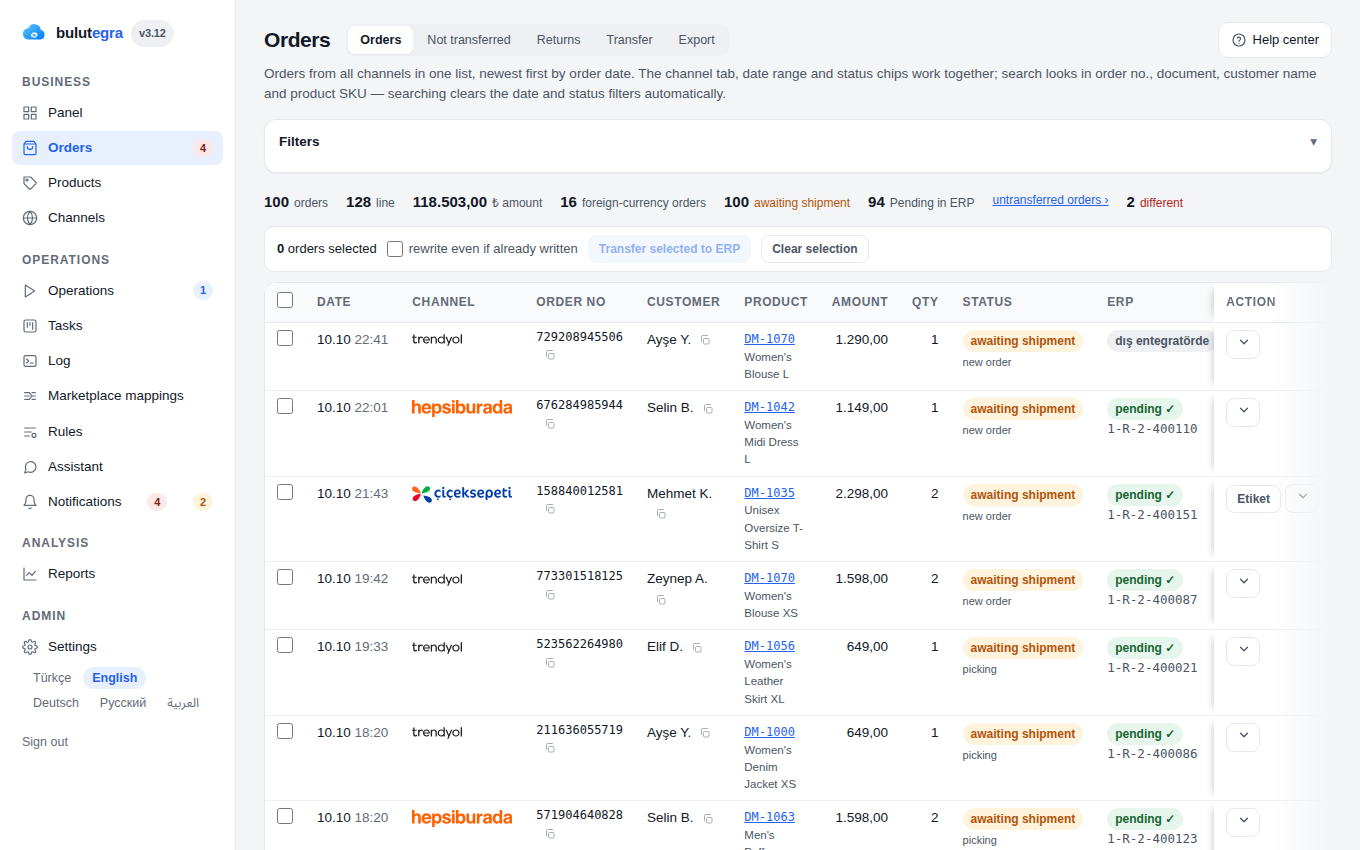
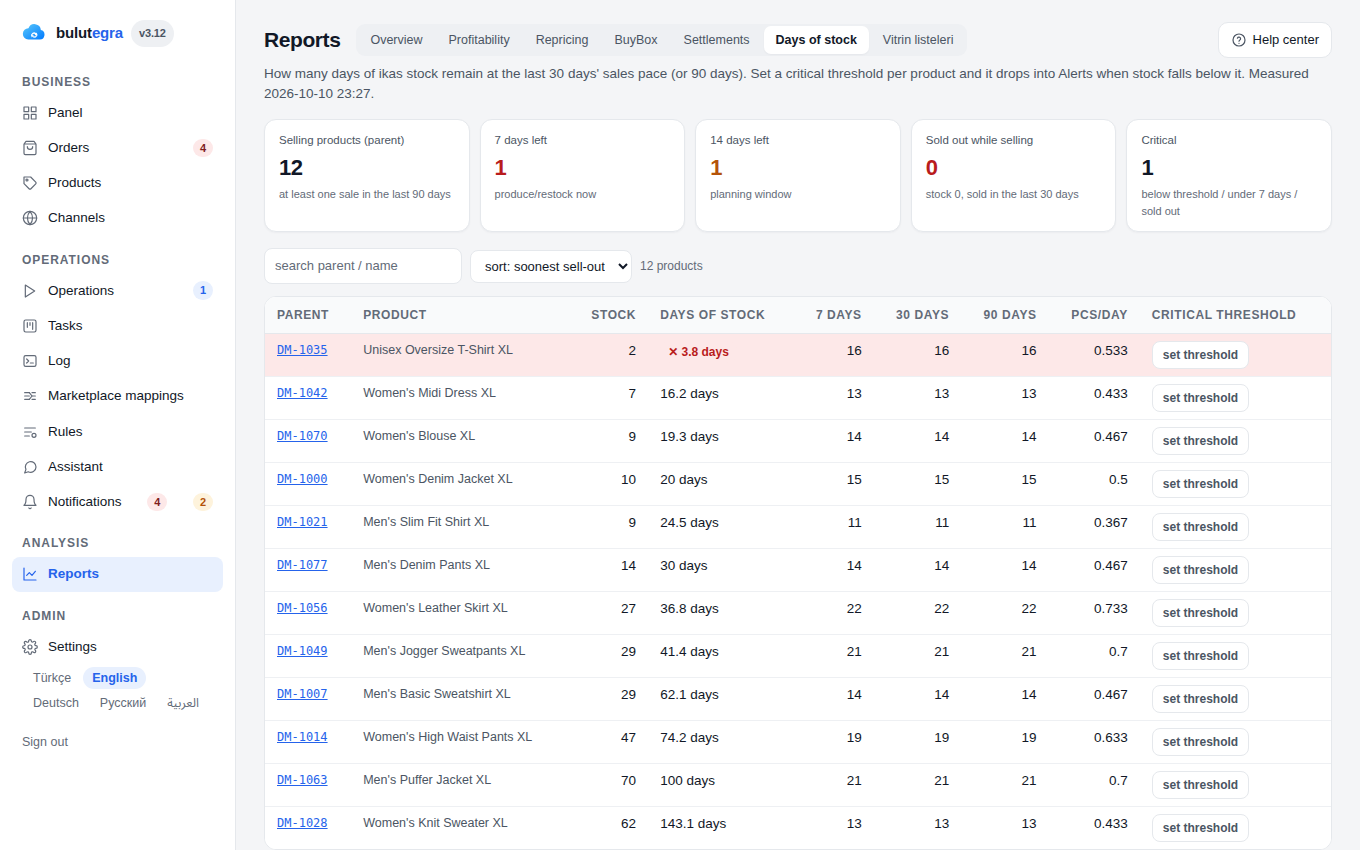
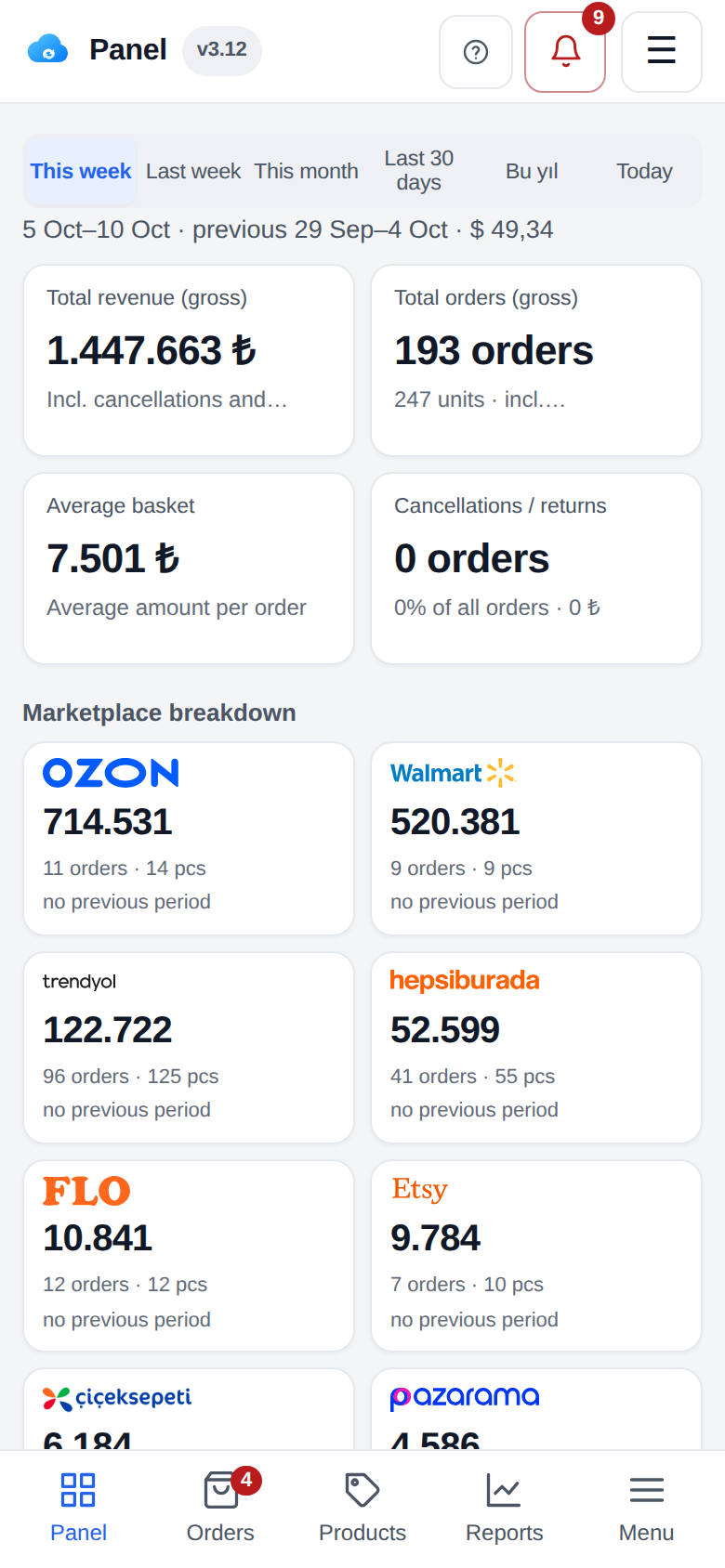
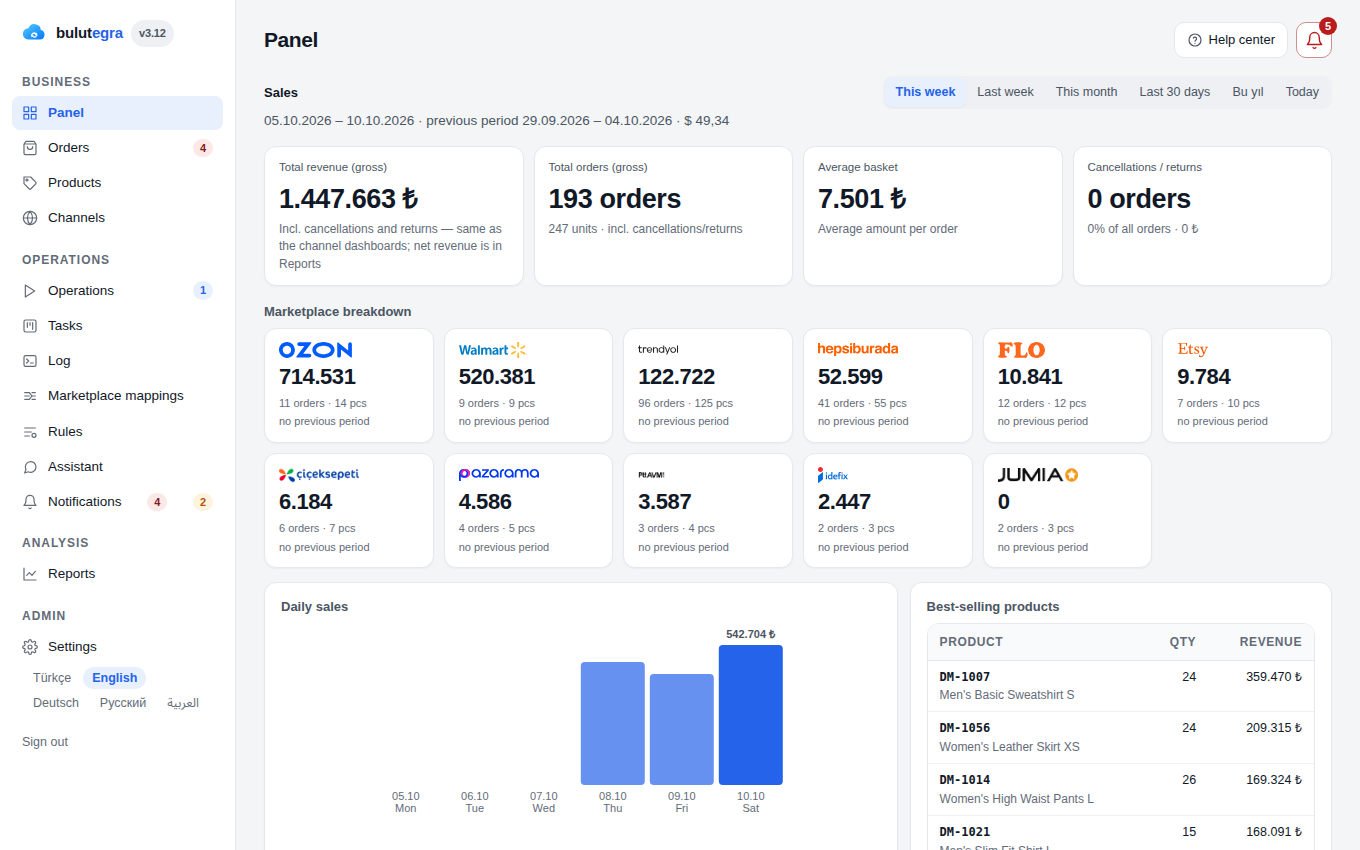
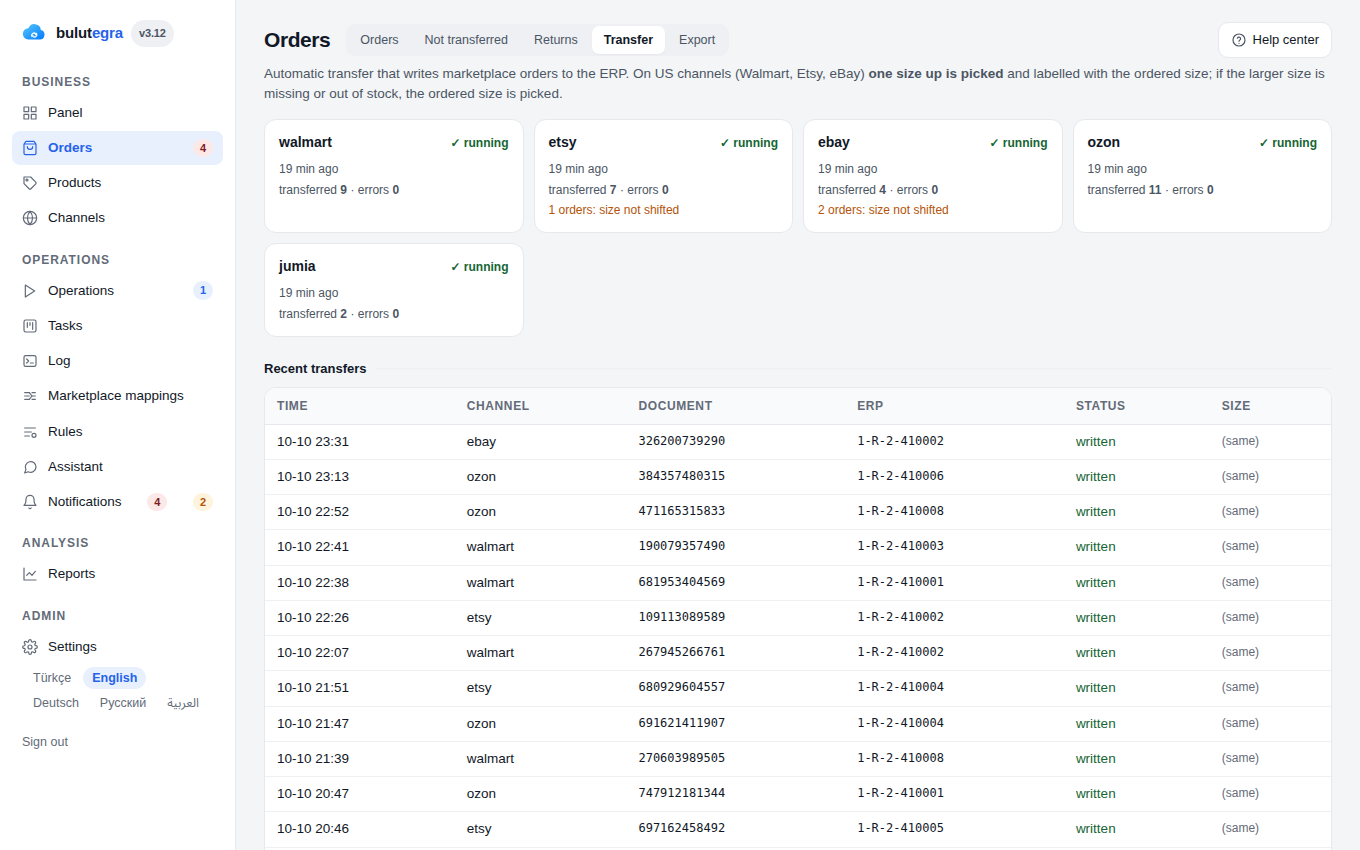
Real panel screenshots — company, products and figures are sample data.
Marketplace integration pricing and plans
Pick by sales volume, upgrade any time. Add-on modules work with every plan.
Starter
- 3 marketplace channels
- Order transfer
- Stock & price sync
- Admin panel & mobile app
- Instant notifications
Professional
- Unlimited marketplace channels
- Everything in Starter
- Bulk product listing
- Returns & cancellation handling
- Shadow verification engine
- BuyBox & competitor price tracking
Enterprise
- Everything in Professional
- Profitability & settlement auditing
- Cross-border sales & micro-export
- Custom ERP integration
- Priority support
Several stores, several ERPs, or custom development?
Multi-store setups, a connector for your own ERP and development around your processes are priced per project. We define the scope together and send a written quote.
Add-on modules and terms
The questions we hear most about Bulutegra
What is Bulutegra?
Bulutegra is a cloud platform where multi-channel sellers manage orders, stock, pricing, customers and product content in one place. It sits between the marketplaces, your own website and your ERP, and takes over the whole flow in between.
How is Bulutegra set up and how long does it take?
Four steps: your accounts are connected (usually half a day), products are matched to ERP records by SKU and barcode (1–3 days), the system watches in read-only shadow mode for one to two weeks, and once the numbers agree, write access is enabled channel by channel.
Which marketplaces does it support?
Internationally: Amazon, eBay, Etsy, Walmart, Ozon, Temu, SHEIN and Jumia. In Türkiye: Trendyol, Hepsiburada, Amazon, N11, Çiçeksepeti, Pazarama, PTT AVM, idefix, Modanisa and Flo. Newly added: noon, Namshi, Allegro, Wildberries, Takealot, Ananas and JustYol — 24 marketplaces in total, plus storefronts, ERPs and carriers: 47 integrations from a single panel.
What does it offer for cross-border sales?
Micro-export paperwork, currency and customs details are prepared at order time. On US orders sizes are converted automatically. Product content is generated in the target market's language, and carriers are configured per channel.
What does it add to my own website?
Reviews accumulated on marketplaces are imported to your site with ratings and customer photos; the size finder tells each visitor the right size for that product; WhatsApp, e-mail and site chat land in a single inbox. It works with ikas, Shopify, WooCommerce and custom platforms.
Do I need to replace my ERP?
No. Bulutegra writes orders directly into your existing ERP; invoicing and shipping continue in your own routine. The goal is to take over the flow in between, not to replace your system.
Let us show you before we tell you.
We will send you login details for a working copy of the panel right away; explore it yourself, then let’s talk.
Show the login details — if you would rather not fill in a form
You can open the same demo environment directly. The data is sample data, so click around freely.
demoPasswordBulutegra-Demo-2026The real panel, sample data.
The screens you will see are the exact panel our customers use. The company, product and revenue figures inside are samples — nobody’s real data is shown.
- All channels summarized on one screen
- How an order is written into the ERP
- How the system catches and explains a problem
- What the marketplace deducted, what you kept
Field notes.
Articles on marketplace integration, ERP, stock and cross-border selling, drawn from our own operation.

Multi-channel commerce report
Built on 2,944 orders: the busiest ordering hour, the share of single-item orders, weekday versus weekend. Open methodology, free PDF.
Let’s plan the right setup together.
Tell us how many channels you sell on and which platform you use — we will get back to you shortly.
Yumurtacı Abdi Bey Cad. 15C, Concord İstanbul C Blok No: 13
Kadıköy / İstanbul